
Software Release 2026.08 Highlights
ModuleWorks 2026.08 offers a range of powerful new and enhanced features for smarter, safer and more connected manufacturing, including physics-aware toolpaths, expanded MDES support for toolpaths and simulations, and GPU-accelerated simulation.
With the new SuperFinish, users achieve superior mold and die surface quality, and VoluMill is now integrated into SmartRoughing for optimized, physics-driven 3-axis roughing. Native MDES support across the toolpath engine and MachSim streamlines tool assembly and equipment data exchange with shopfloor solutions, while enhancements in machining direction optimization, hole filtering, turning containment, and engagement tracking cut manual effort and reduce errors. Discover all the highlights below.
Toolpath
Multi-Axis Roughing | Automatic 3+2-Axis Roughing
Feature-Based Machining Direction Optimization
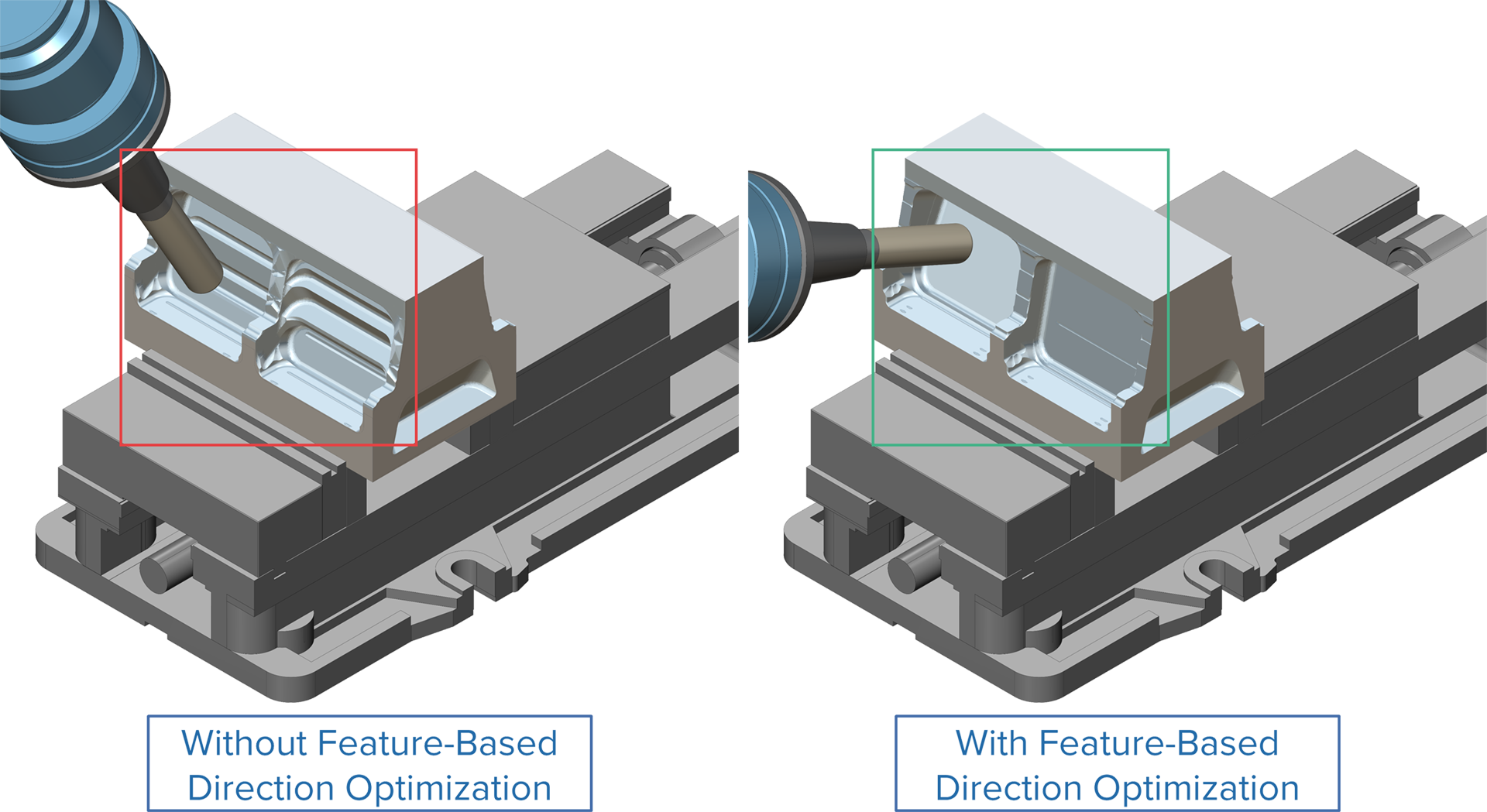
Challenge: Selecting machining directions based solely on material removal volume ignores the part’s actual geometry, leading to suboptimal toolpaths, excess tool orientations and longer cycle times.
Solution: The direction search now analyzes the part’s geometric features and mesh to determine the fewest, most effective tool orientations while automatically accounting for the actual workpiece shape.
Benefits: Fewer tool orientations mean shorter programs, reduced setup time and lower production costs without sacrificing machining coverage or part quality.
3-Axis Finishing | SuperFinish
Introducing SuperFinish
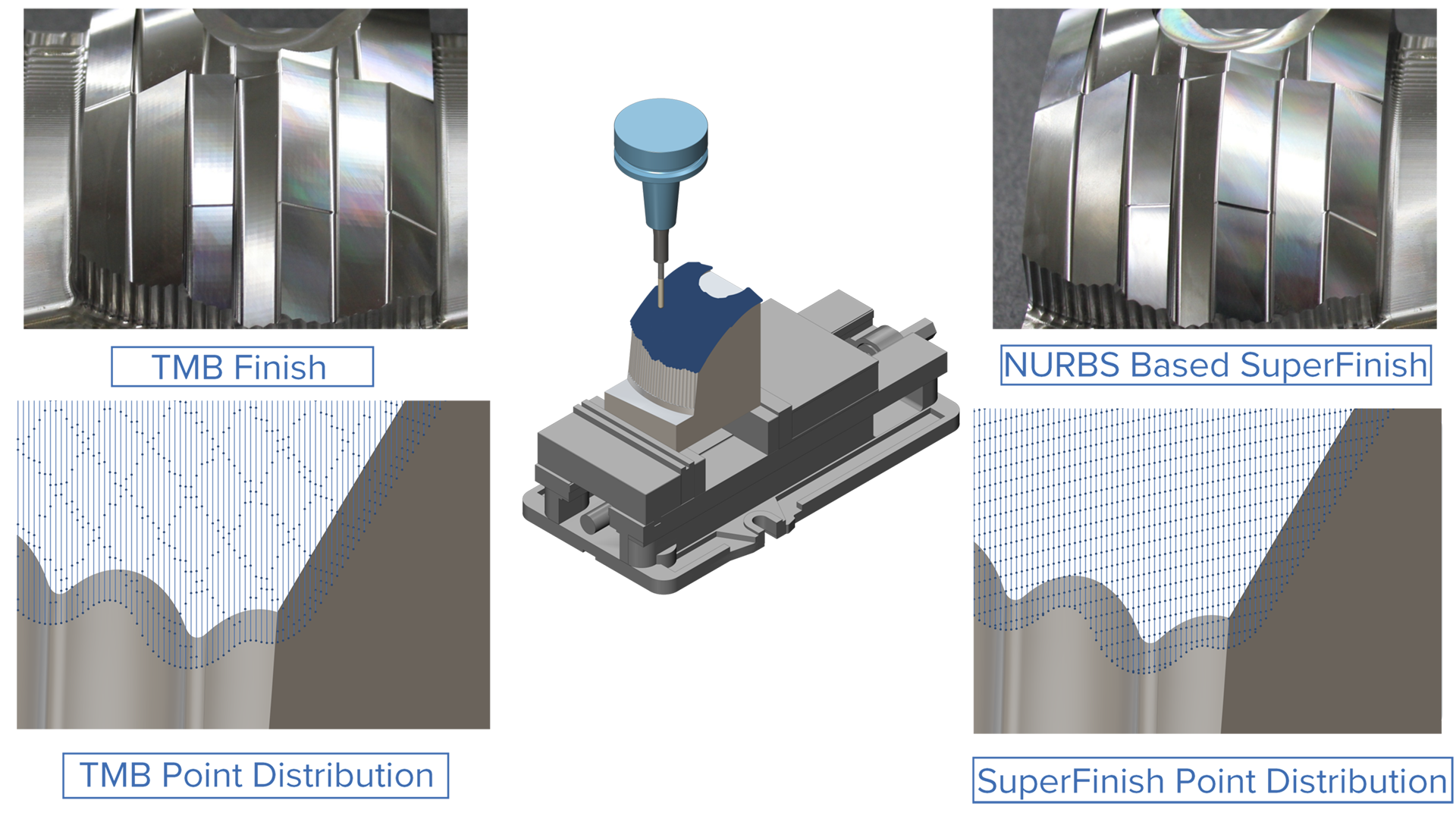
Challenge: Finishing complex multi-patch NURBS surface models presents a fundamental trade-off: NURBS-based cycles struggle at patch boundaries and produce inconsistent surface quality, while mesh-based cycles are more robust but lack the surface accuracy required for precision finishing.
Solution: The combined approach of SuperFinish uses NURBS-based precision for toolpath accuracy alongside the stability of mesh-based geometries. This delivers high geometric fidelity with the reliability needed for mold and die machining.
Benefits: Deliver superior, NURBS-quality surface finishes with complete reliability, while leveraging advanced capabilities like rest machining and dynamic height control, regardless of input surface quality.
3-Axis Finishing | Mesh Finishing
Automatic Hole Filtering

Challenge: When a part contains holes that will be machined later, programmers often need to manually close them in CAD before generating toolpaths. This repetitive workaround adds unnecessary setup time and interrupts the programming workflow.
Solution: A configurable hole-size threshold lets users specify which holes to ignore during flatland toolpath generation. The toolpath is computed as if those holes were solid material, with no CAD modification required.
Benefits: Automated hole suppression eliminates manual CAD rework, reducing programming effort and minimizing the risk of geometry-editing errors.
3-Axis Roughing | SmartRoughing
SmartRoughing with VoluMill
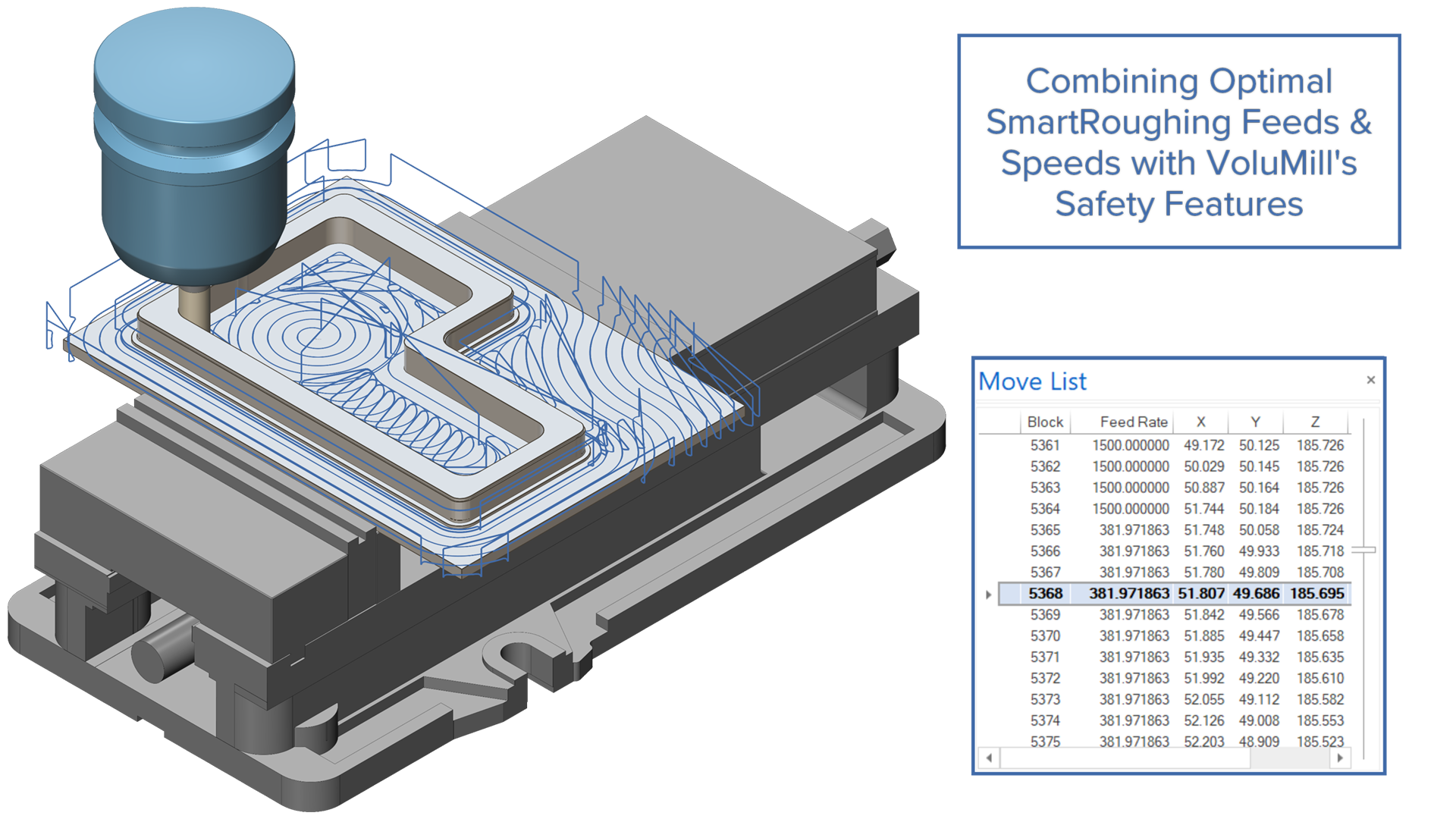
Challenge: SmartRoughing previously only supported the Adaptive pattern, so VoluMill users could not benefit from SmartRoughing’s automatic optimization, and any combined strategy had to preserve VoluMill’s corner-feed reductions instead of overwriting them.
Solution: VoluMill is now available as a pattern inside SmartRoughing: SmartRoughing optimizes cutting depth, width, spindle speed and nominal feed, while VoluMill drives the toolpath and applies dynamic feed reductions in corners and high‑engagement areas, with both algorithms exchanging data so each respects the other’s limits.
Benefits: VoluMill users can adopt SmartRoughing without changing their preferred pattern, gaining automatic parameter optimization plus VoluMill’s corner‑feed control, and shops can switch between Adaptive and VoluMill patterns within a single optimized roughing workflow.
Toolpath | MDES
MDES Tool Assembly Integration for Toolpath
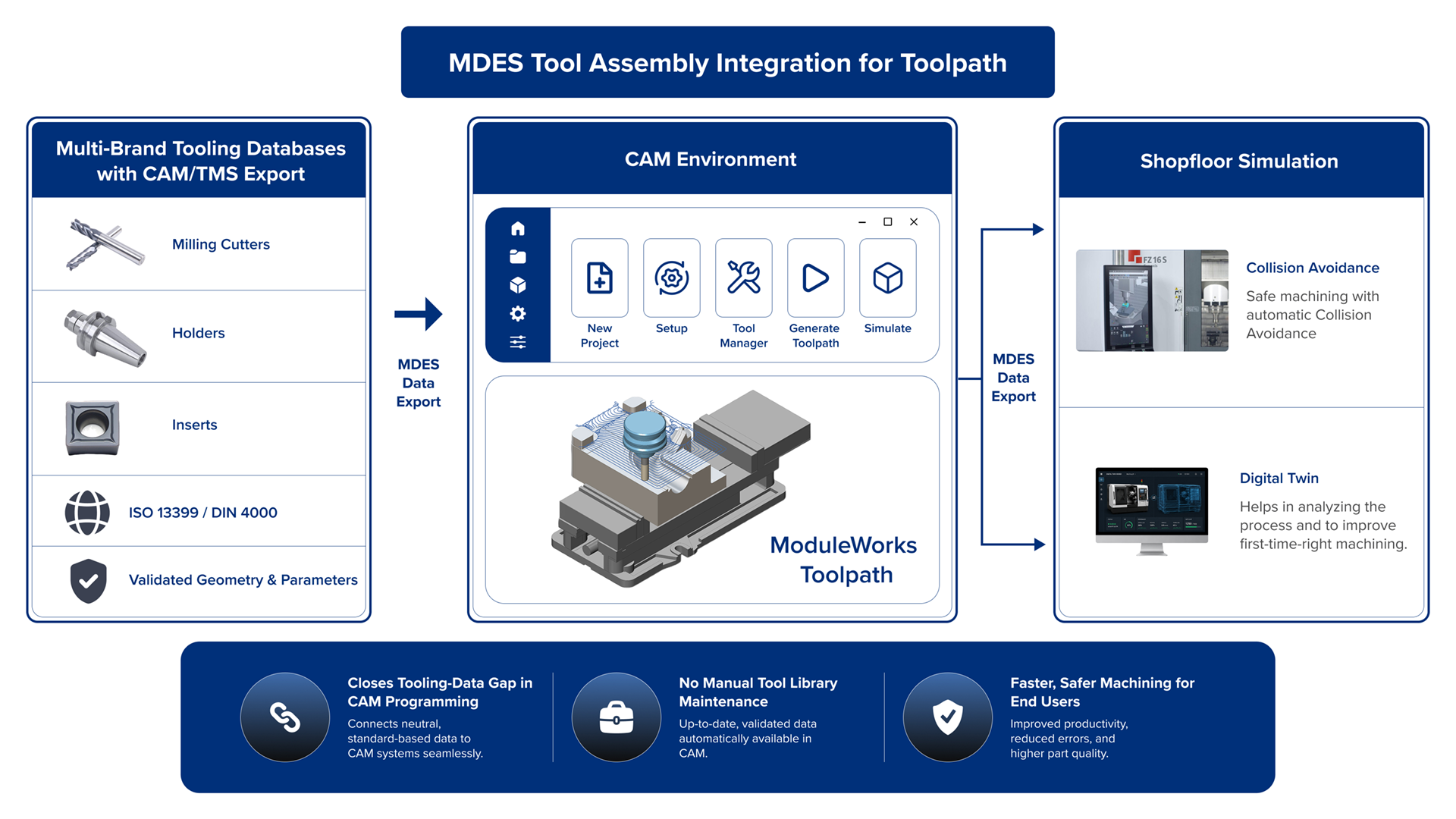
Challenge: The lack of standardized tool assembly definitions in the current toolpath SDK creates major interoperability challenges across the CAM ecosystem, forcing incompatible tool libraries, manual data recreation, custom integrations and loss of tool assembly fidelity between systems, ultimately limiting seamless workflow automation and scalable digital manufacturing integration.
Solution: The toolpath engine now supports MDES natively, enabling tool assembly objects to pass directly into toolpath calculations without a translation layer. Existing proprietary tool definitions remain fully supported, so teams can adopt MDES incrementally.
Benefits: With direct support for MDES-compliant tool libraries, integration becomes faster and easier without the need for custom adapters or data conversions.
Turning | Turning Basic
Predictive Containment Projection for Partial Geometries

Challenge: In turning operations, partially defined or trimmed profiles often do not reach the stock boundary. Existing containment options offer limited control over how these gaps are closed, leading to unpredictable toolpaths and unexpected cuts.
Solution: Users can define a direction vector to extend open curve endpoints to the material boundary, providing explicit, repeatable control over how partial geometry connects to the stock.
Benefits: With this enhancement, users can generate predictable and repeatable toolpaths from partially defined geometries, precisely limiting turning operations to intended regions. This reduces unintended overcuts or missed material, minimizes manual geometry modification, and improves the robustness of automated toolpath workflows.
Simulation
Simulation Systems | Machine Simulation
MDES Equipment Starter Export
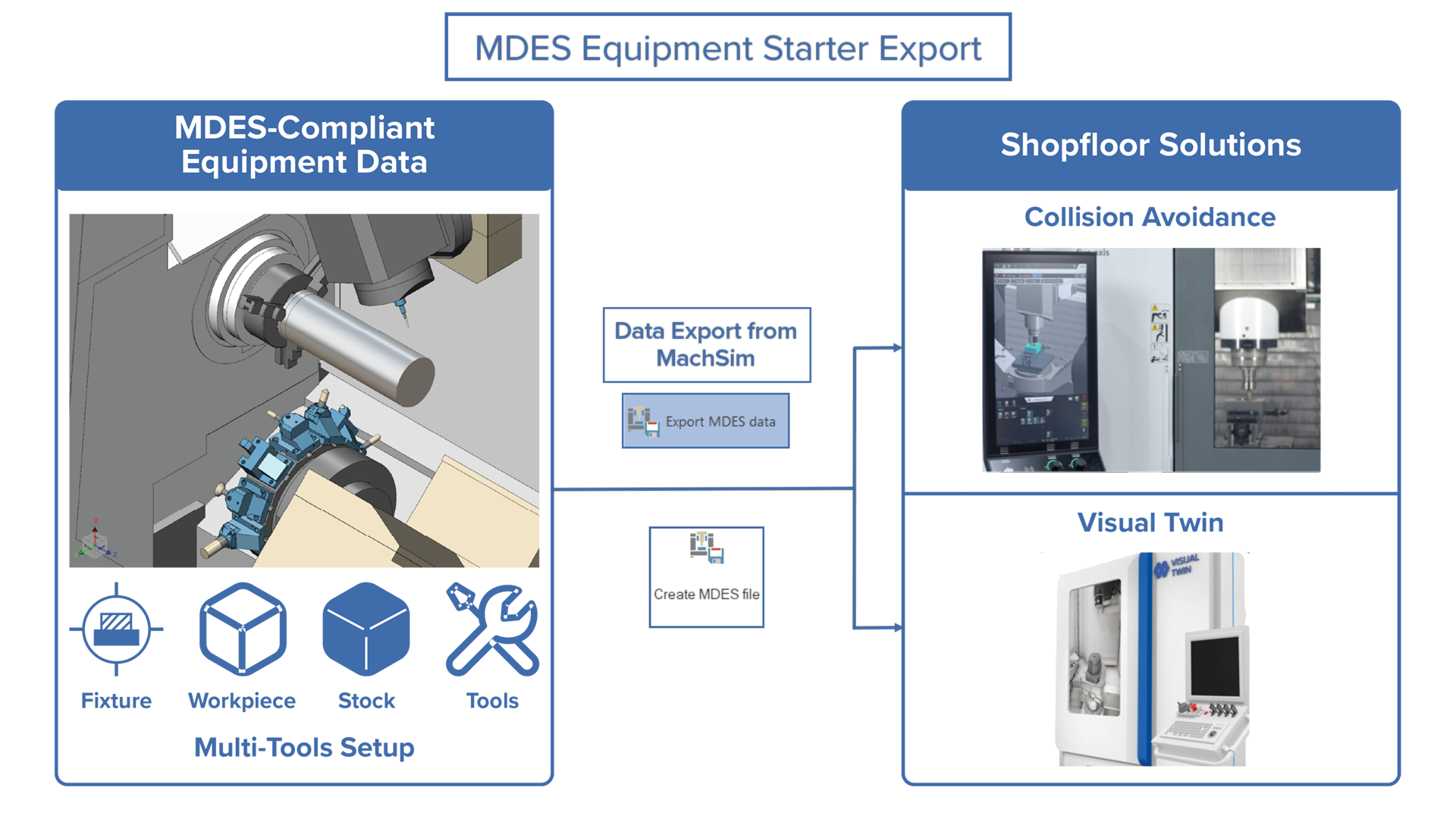
Challenge: Until now, shop floor solutions, such as digital twins and collision avoidance systems, have lacked a simple, standardized way to access complete machine setup data, resulting in workflow bottlenecks and error-prone manual input.
Solution: This release introduces MDES-compliant equipment data export from MachSim. Shopfloor solutions can now access machine setup data through an open, validated, standards-based interface, eliminating the need for custom bridges and manual data transfer.
Benefits: MDES enables seamless interoperability with shopfloor solutions. The ModuleWorks CAS and VisualTwin can immediately use MDES data, reducing integration effort. For end users, this means fewer manual inputs, fewer errors and faster machine setup.
Simulation SDK | Cutting Simulation
High-Performance Engagement Tracking
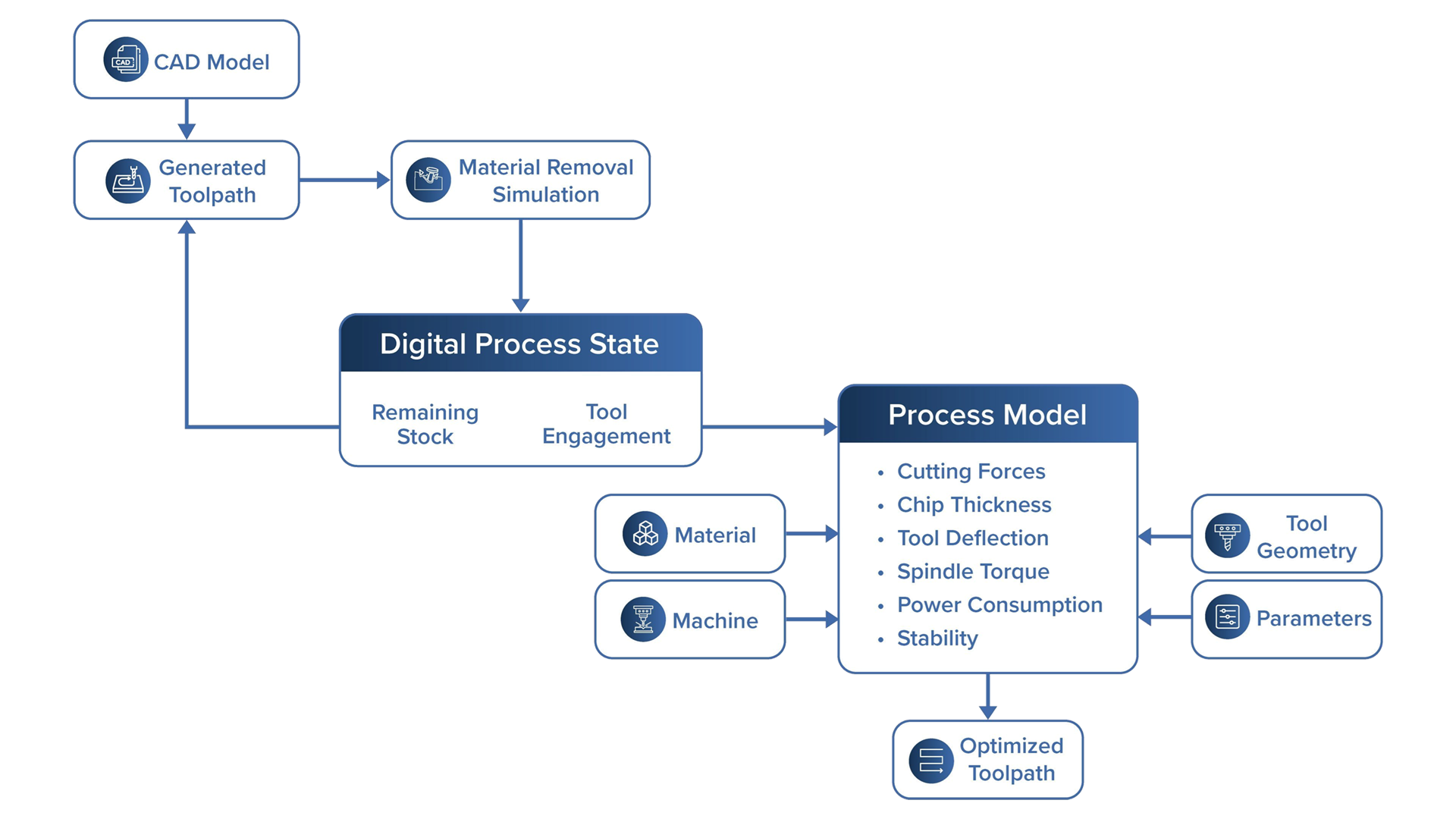
Challenge: Optimizing toolpaths and cutting parameters requires accurate insight into tool engagement throughout the machining process. However, analyzing engagement across large and complex toolpaths can be computationally intensive, making high-resolution tracking time-consuming and limiting the efficient use of engagement data for process optimization.
Solution: A new snapshot-based engagement tracking approach has been introduced that distributes calculations across multiple CPU cores and utilizes GPU parallel processing to efficiently compute per-cut engagement data while maintaining high-resolution accuracy.
Benefits: This enhancement significantly reduces computation time, especially on modern multi-core systems. With GPU acceleration, engagement analysis is up to five times faster, improving the efficiency of data-driven optimization of toolpaths and cutting parameters.
Automation
Automation Framework | Next-Generation Shopfloor Programming
Automatic Machining Direction and Feature Type Suggestion

Challenge: Identifying the correct machining direction is a mandatory first step before any operation can proceed. Doing this manually for every feature is time-consuming and error-prone, slowing down programming and increasing the risk of invalid setups.
Solution: HAFD automatically analyses selected features and suggests the valid machining direction and feature type, eliminating manual determination at this step.
Benefits: Fewer manual steps per feature selection means programmers reach valid machining setups faster, with less risk of configuration errors.
Process Technology
Process Technology | Multi-Axis Additive
Number of Steps Option for Multi-Axis Additive
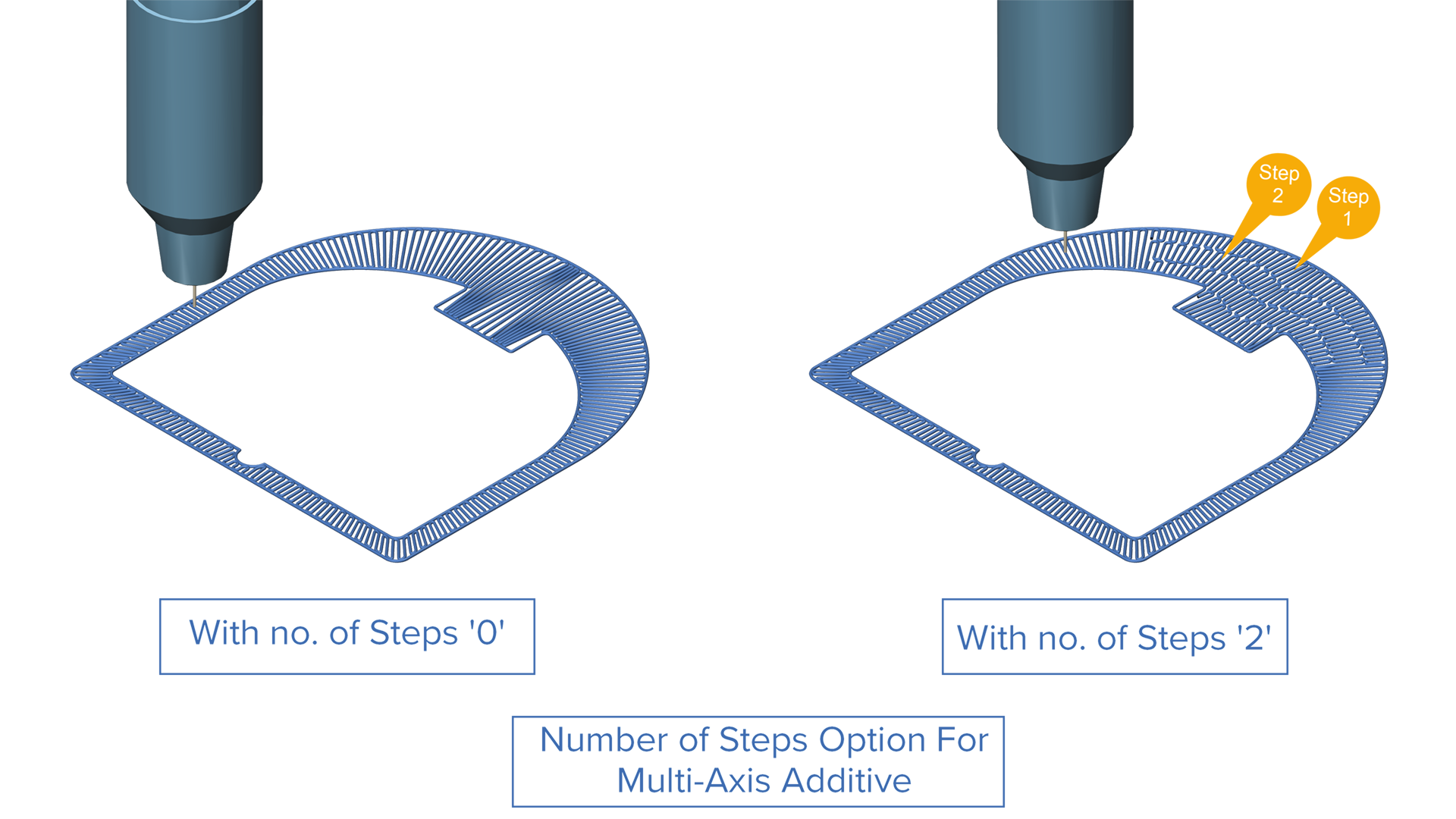
Challenge: Entering a value of 1 for the “Number of Slices” generated 3 or more paths. The number of generated paths was correct, but the disconnect between input and output made the medial axis method feel unpredictable and hard to trust.
Solution: To improve clarity, “Number of Slices” has been renamed to “Number of Steps”. This is the parameter that users are actually controlling. It corresponds exactly to the number of generated paths.
Benefits: Renaming the parameter makes it more intuitive to use and provides greater transparency over the results.
Discover the many other new enhancements in this release.