
SmartRoughing · Tooling Demo · Autodesk Fusion
Same Machine. Same Material.
Different Tool. Different Result.
SmartRoughing reads your tool’s geometric properties – diameter, stick-out length, flute count – and calculates how much the tool can physically handle before it deflects. This demo shows how shortening the stick-out and adding a flute unlocks progressively faster cycle times, with identical machine and material throughout.
- Material: AISI 4140
- Tool: Kennametal Ø8 mm
- 3 setups compared
- 2:09 → 1:24 cycle time
- 35%
Max time saving - 3
Setups tested - 38 → 20 mm
Stick-out range - 4 → 5
Flute count
Tool & Holder Specification
Same Tool Family Across All Three Setups — Only Stick-Out Length and Flute Count Change.
Tool Geometric Parameters
Parameter | Value |
|---|---|
Diameter | 8 mm |
Flute length | 12 mm |
Shoulder length | 12 mm |
Stick-out length (tested) | 20 mm or 38 mm |
Overall length (tested) | 58 mm or 76 mm |
Flute count (tested) | 4 or 5 |
Holder Information
Parameter | Value |
|---|---|
Holder description | BT40BHC08080M |
Product ID | 1315342 |
Vendor | Kennametal |
Gauge length | 79.64 mm |
Material | AISI 4140 |
Machine | Same across all setups |
Note on Assembly Values
The tool’s overall length and the length below the holder may not reflect the exact values of assemblies provided directly by Kennametal. These setups are intended solely to demonstrate SmartRoughing capabilities.
How SmartRoughing Adapts to Your Tool
Two tool properties directly drive what cutting conditions SmartRoughing will allow.

Reads Stick-Out Length
The longer the tool sticks out from the holder, the more it flexes under cutting forces. SmartRoughing calculates BNDLim — the maximum allowable deflection before vibration, poor surface finish, or tool breakage — directly from the stick-out length entered in the tool definition.

Reads Flute Count
More flutes mean more cutting edges engaging the material per revolution. SmartRoughing uses the flute count to calculate the maximum F that keeps chip load per tooth within safe limits. A 5-flute tool can feed faster than a 4-flute tool at the same chip load per tooth.

Maximises MRR within BNDLim
ap, ae, F, and S are all pushed upward until BNDLim is reached. A shorter, stiffer tool raises the BNDLim ceiling — SmartRoughing immediately exploits that extra headroom. The machine and material stay the same; only the tool changes.
Key Principle for Fusion Users
In the spindle demo, BNDLim was the final barrier on the most powerful machine — the only way to go faster was a better tool. This demo shows exactly that scenario: the machine has already been fully optimized, and the tool is the only remaining variable. Shortening the stick-out and adding a flute is the most cost-effective and fastest way to unlock more performance from SmartRoughing.
Cycle Time Comparison
All three setups cut the same part in AISI 4140 on the same machine. Only the tool assembly changes.
D8 L38 · 4 Flute
38 mm stick-out · longest / most flexible
D8 L20 · 4 Flute
20 mm stick-out · shorter, stiffer
D8 L20 · 5 Flute
20 mm stick-out · shorter + extra flute
2:09 - D8 L38 · 4F
- Baseline
1:34 - D8 L20 · 4F
- Shorter stick-out
- −35 sec
1:24 - D8 L20 · 5F
- Shorter + 5 flutes
- −10 sec
Setup-by-Setup Analysis
What SmartRoughing actually does – and what constrains it – on each tool assembly.
D8 L38 · 4 Flute
1
38 mm stick-out · Overall length 76 mm
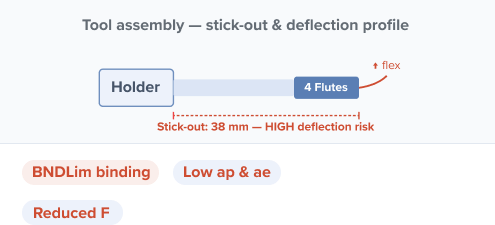
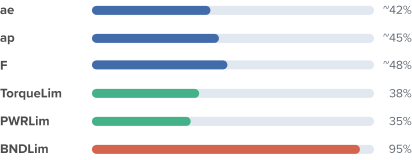
At 38 mm stick-out the tool is at its most flexible. BNDLim is hit early, forcing SmartRoughing to keep ap, ae, and F conservative. The machine and spindle have ample headroom — the tool is the bottleneck.
D8 L20 · 4 Flute
2
20 mm stick-out · Overall length 58 mm
1:34 machining time
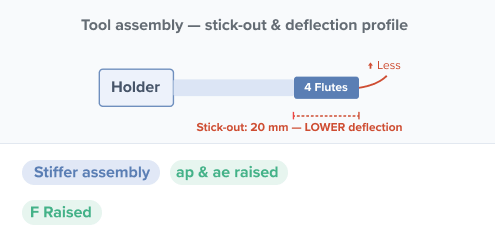
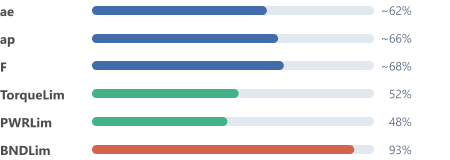
Halving the stick-out from 38 mm to 20 mm dramatically increases tool rigidity. BNDLim rises, and SmartRoughing automatically exploits the extra headroom — ap, ae, and F all increase. Cycle time drops by 35 seconds with no other change.
D8 L20 · 5 Flute
3
20 mm stick-out · Overall length 58 mm
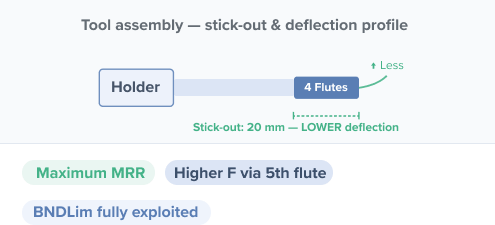
Same 20 mm stick-out as setup 2, but the extra flute allows SmartRoughing to raise F further while keeping chip load per tooth the same. BNDLim is still the ceiling — but the 5-flute tool can produce more material removal per revolution without exceeding it.
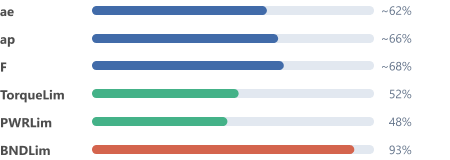
The Key Insight — Bndlim Stays Binding Across All Three Setups
Notice that BNDLim is at ~94–95% in every setup. SmartRoughing always finds the ceiling and pushes right up to it. Shortening the stick-out raises that ceiling (the tool is stiffer, so it can take more force before deflecting), and adding a flute lets F climb without the chip load per tooth increasing. The machine’s TorqueLim and PWRLim stay comfortably underutilised throughout — the tool is the only constraint in play.
What Drives Performance in Each Setup?
SmartRoughing targets BNDLim in all three cases — the variable is how high that ceiling sits
D8 L38 · 4 Flute
BNDLim binding — low ceiling
Long stick-out means high deflection risk. BNDLim ceiling is low. SmartRoughing keeps ap, ae, and F conservative to stay within

D8 L20 · 4 Flute
BNDLim binding — raised ceiling
Shorter stick-out raises the BNDLim ceiling. SmartRoughing immediately pushes ap and ae higher. Same chip load per tooth, more material per pass.

D8 L20 · 5 Flute
BNDLim binding — Funlocked
Same stiffness as setup 2, but the 5th flute allows SmartRoughing to run a higher F with the same chip load per tooth — the fastest cycle time of the three.
Parameter Reference
What SmartRoughing balances — and how each responds as tool stiffness and flute count change
Parameter | Full Name | Type | Effect as tool stiffness increases (shorter stick-out) | Effect of adding a flute (4→5) |
|---|---|---|---|---|
ae | Radial engagement (step-over) | Cutting | Increases — stiffer tool can sustain a wider radial engagement without deflecting | Minimal change — ae is governed by stiffness, not flute count |
ap | Axial depth of cut | Cutting | Increases — stiffer tool allows deeper axial cuts per pass before BNDLim is reached | Minimal change — ap is governed by stiffness, not flute count |
F | 12 mm | Cutting | Increases — stiffer tool allows higher feed without exceeding deflection limit | Significant increase — more flutes = more cutting edges per revolution = higher F at same chip load per tooth |
S | 20 mm or 38 mm | Cutting | Largely unchanged — spindle speed is determined by the machine, not the stick-out | Unchanged — same RPM, more edges doing the work |
TorqueLim | 58 mm or 76 mm | Machine | Remains underutilised across all setups — the machine has spare capacity throughout | Slight increase as MRR grows, but remains well below limit |
PWRLim | 4 or 5 | Machine | Remains underutilised — power is not the constraint in any setup | Slight increase, still well below limit |
BNDLim | Tool bending / deflection limit | Tool | Ceiling rises — shorter stick-out means less deflection per unit of cutting force, raising the allowable BNDLim | Unchanged — BNDLim is set by stiffness (geometry), not flute count |
MRR | Material removal rate | Output | Increases directly — higher ap and ae mean more material removed per pass | Increases — higher F means more material removed per unit time |
Practical Takeaway for Fusion Users
When SmartRoughing is constrained by BNDLim — which it will be on any high-performance machine — there are exactly two levers available in the tool library: shorten the stick-out to raise the BNDLim ceiling and unlock ap and ae, or add a flute to unlock F without touching stiffness. Both changes are made in the Fusion tool definition and take effect immediately the next time SmartRoughing calculates the toolpath. No manual parameter editing required.
Try it yourself
Download the Fusion 360 archive and open it directly in Autodesk Fusion to explore the toolpaths used in this demo – Autodesk Fusion 360 archive · all three tool setups · AISI 4140 · Kennametal Ø8 mm